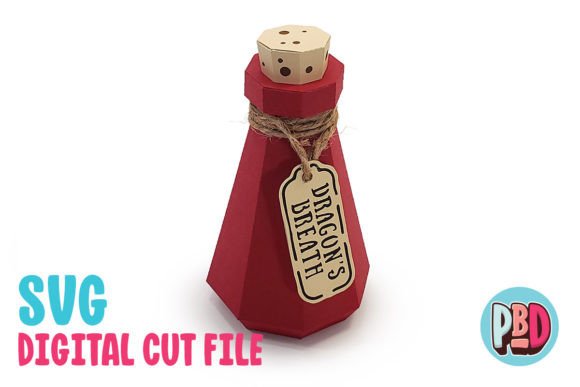
Dragon’s Breath Potion 3D Papercraft
If you are looking for a creative project that blends seasonal charm with practical utility, the Dragon’s Breath Potion 3D Papercraft is an excellent choice. This design transforms simple paper into a striking three-dimensional object that captures the imagination. Whether you are preparing for a spooky Halloween celebration, planning a fantasy-themed party, or simply want to add a touch of magic to your home decor, this papercraft offers a versatile solution. It serves not only as a decorative piece but also functions effectively as a unique treat gift box, making it a dual-purpose item for any event.
Why Choose This Papercraft Design?
The appeal of the Dragon’s Breath Potion lies in its balance of aesthetic detail and structural simplicity. At 3 W x 3 D x 6 H, it is substantial enough to be noticed on a shelf or table but compact enough to fit easily into various spaces. The potion bottle shape is iconic, evoking images of alchemy, magic shops, and fantasy adventures. By building this model, you create a tangible piece of art that can enhance the atmosphere of your gatherings.
One of the primary goals of this design is to provide a high-quality result without requiring advanced crafting skills. The instructions are designed to guide you through the process step-by-step. However, the quality of the final product depends largely on the materials you choose. It is intended to be built using medium to heavy cardstock. Using thinner paper may result in a fragile structure that cannot hold its shape, while too thick a material might make assembly difficult if the cuts are not precise. A full material list is included in the PDF instructions to help you select the best paper for your needs.
Perfect for Events and Gifting
This Dragon’s Breath potion design would be a great addition to your Halloween decor, parties, or events. Imagine placing several of these bottles on a mantelpiece, surrounded by fake spiderwebs and candles. They create an immediate sense of mystery and fun. For parties, they can serve as centerpieces or even as functional containers for candy, small toys, or party favors. Because it makes a great treat gift box, you can fill the hollow interior with chocolates, cookies, or other sweets before handing them out to guests. This adds a personal, handmade touch to your gifts that store-bought items often lack.
Beyond Halloween, the fantasy theme allows for year-round use. Educators might use it in classroom settings to teach geometry, spatial reasoning, or history related to medieval alchemy. Hobbyists can display them in glass cabinets alongside other collectibles. Entrepreneurs selling handmade goods at craft fairs can offer these as affordable, high-margin items that customers appreciate for their uniqueness.
What Is Included in the Download?
When you purchase the digital download, you receive a single ZIP file containing everything you need to start creating immediately. The package includes:
- SVG Cut File: Ideal for modern cutting machines like Cricut or Silhouette Designer Edition and above.
- DXF Cut File: Compatible with older software versions, such as Silhouette Basic Edition.
- PDF Instructions: Detailed visual guides to ensure accurate assembly.
It is important to note that all files will need to be extracted from the ZIP archive before you can use them. Many users overlook this step, leading to confusion when they try to open the files directly. Always unzip the folder first to access the individual components.
Software Compatibility and Technical Tips
To get the best results, understanding which file format works best for your equipment is crucial. The SVG cut files are generally the preferred option. They can be used with Silhouette Designer Edition and above or Cricut Design Space. These formats tend to produce cleaner lines and load faster in most software platforms. If possible, always use SVG files for the smoothest experience.
For those who prefer or require DXF files, they can be used with Silhouette Basic Edition. However, there are some important technical considerations to keep in mind. DXF files open slowly in Silhouette Studio and are not as clean as SVG files. You may notice slight imperfections in the lines that could affect the precision of your cuts.
Crucial Step for DXF Users: You must ensure that your DXF preferences are set correctly in Silhouette Studio for the file to load properly. If you skip this step, the design may appear distorted or fail to import entirely. Follow these steps to set DXF preferences:
- Edit Preferences.
- Select Import DXF.
- Open the settings menu.
- Change the setting from “As-is” to “Centered.”
This adjustment centers the artwork correctly within the workspace, preventing alignment issues during the cutting process. Please note that other software platforms have not been tested with these specific files, so sticking to the recommended software ensures compatibility.
Building Your Collection
While the Dragon’s Breath Potion stands alone beautifully, it is part of a larger ecosystem of magical designs. Be sure to download the other potion bottles as well to have a complete set. Creating a collection allows you to build a more immersive scene. Different colors and labels can represent different types of magic or spells, adding depth to your display. You can check them out on our Artist portfolio page to see the variety available. Mixing and matching these designs can lead to creative combinations that reflect your personal style.
Final Thoughts on Assembly
Creating the Dragon’s Breath Potion 3D Papercraft is a rewarding experience that bridges the gap between digital design and physical craftsmanship. It requires patience and attention to detail, particularly when scoring and folding the cardstock. Take your time with each step. Use a bone folder or a blunt tool to score the fold lines lightly; this helps create crisp, professional-looking edges. When gluing, apply adhesive sparingly to avoid warping the paper.
Whether you are a beginner looking for a manageable weekend project or an experienced crafter seeking new templates for your shop, this papercraft offers value. It supports goals ranging from personal enjoyment and home decoration to commercial sales and educational activities. By following the provided instructions and utilizing the correct file formats, you can bring this magical potion to life with confidence.
Remember, the key to success lies in preparation. Ensure your cutting machine is calibrated, your cardstock is the right weight, and your software settings are optimized. With these elements in place, you will be able to produce a stunning Dragon’s Breath Potion that delights everyone who sees it. Happy crafting!